GPS Location : Live Tracker
- 3.4
- Rating
- 100.00K
- Installs
- Free
- Price

 Analysis by App-foxy
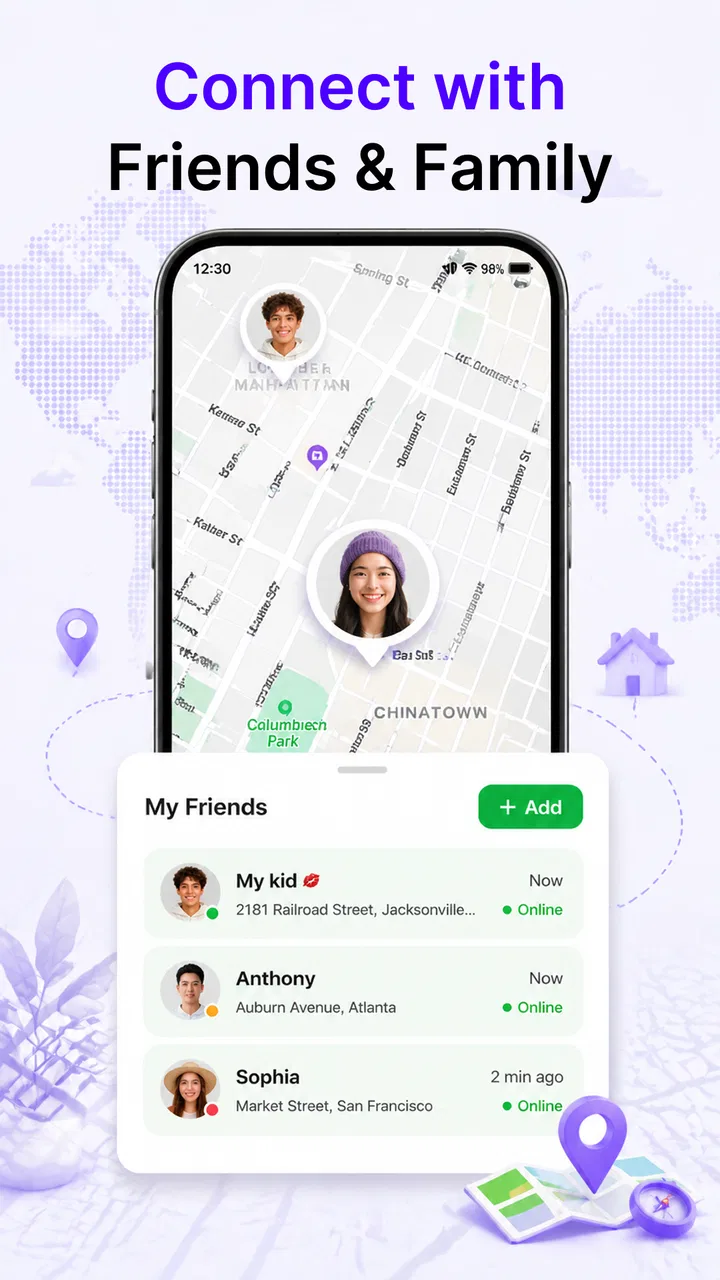
GPS Location: Live Tracker is the kind of safety app I would consider for a family that wants a simple way to share whereabouts without turning everyday travel into a complicated routine. It sits in the Maps & Navigation category, comes from FalconMedia, and focuses on location sharing with children plus an SOS function for situations that need urgent attention. That combination gives it a clearer purpose than a general map: it is less about finding restaurants or planning routes and more about keeping an eye on people who may need a dependable line of contact.
I approached it as a practical tool rather than a novelty. The important question is not whether a location app can show a map, but whether it feels usable when someone is leaving school, walking home, traveling alone, or suddenly needs help. My overall impression is that its appeal comes from being focused. It does not need to replace a full navigation service to be useful. It needs to make sharing a location and reaching an emergency option feel straightforward.
How the app feels during everyday use
The first thing I noticed about this type of app is that speed is judged in small moments. A parent checking where a child is does not necessarily expect a detailed route planner; they want the relevant screen to open without confusion and the current location to be understandable. GPS Location: Live Tracker is best viewed through that lens. Its value depends on reducing the number of decisions between opening the app and knowing what is happening.
You May Also Like

 Blood Strike: 2.5 Anniversary
Blood Strike’s Loadouts Turn Every Drop Into a Tactical Gamble
A close look at Blood Strike’s custom loadouts: how fast access to signature weapons reshapes its battle royale rhythm, rewards preparation, and narrows the gap between fights.

 Pandora - Music & Podcasts
Pandora’s Music Is Easy to Start, but Harder to Recover
Pandora’s strength is its low-effort path from a seed to a station. Its weak spot is how much confidence it asks you to place in connection, setup, and quiet recovery.

 8 Ball Pool
 Is Built on Rivalries, Rematches, and Routine
A close look at the rivalries, rematches, shared routines, and unanswered safety questions that turn a quick pool match into a persistent mobile community.

 Samsung Music
’s Quiet Strength Is Playing What You Already Own
Its reach comes less from spectacle than from dependable access to a personal library. That simplicity is both the app’s strongest retention engine and its ceiling.

 AccuWeather: Weather Radar
AccuWeather Review: A Quick, Clear Forecast for Everyday Decisions
For everyday plans, the best forecast is the one you can understand quickly. AccuWeather makes rain timing, radar, and local conditions easy to act on, with a few trade-offs.

 Hill Climb Racing
Why Hill Climb Racing Still Turns Crashes Into One More Run
A tiny car, a bumpy hill and one more upgrade: Hill Climb Racing keeps resurfacing because its simple chaos makes every near-miss feel personal.
More From Our News Desk



I would not treat the presence of GPS as a promise of instant positioning in every situation. Location services can behave differently indoors, in dense urban areas, or when a phone has limited access to the sky. That is not a flaw unique to this app, but it matters when setting expectations. A sensible family routine should include checking that location sharing is active before a journey, rather than waiting until the person is already late.
The app is free to download, while in-app purchases range from a couple of dollars to just under ten dollars per item. That makes it easy to try without committing immediately, although I would still look carefully at what any optional purchase changes before paying. For a safety tool, the difference between a genuinely useful addition and a feature you rarely need is important. I prefer to decide that after testing the basic workflow in calm conditions.
One practical advantage is that the app’s purpose is easy to explain to a child. Instead of presenting a long list of travel features, I could describe it as a way to share location and use SOS when something feels wrong. That simplicity can help younger users remember what to do. The trade-off is that a focused safety app may feel less versatile than a familiar map application that already handles directions, traffic, places, and messaging in one ecosystem.
What happens when several people rely on it
The demanding moments are not necessarily the moments with the most map detail. They are the moments when several people are checking in, a child is moving between places, or an adult is trying to react quickly instead of browsing. In those situations, clear organization matters more than decoration. I would use it with a small, agreed routine: the child shares their location before leaving, the parent checks it at an appropriate time, and everyone knows when SOS is meant to be used.
That routine also prevents a common mistake with tracking tools: checking constantly without a clear reason. Excessive checking can create anxiety and may encourage a child to feel watched rather than supported. The better use is expectation-based. For example, if a child normally walks home after an activity, the family can agree that a location check is useful if the expected arrival window passes or if the child sends a message asking for help.
A less obvious use is preparing for transitions rather than emergencies. A teenager going from school to a friend’s house, an older child attending an unfamiliar event, or a family member traveling through a busy area can share their location for that particular period. This gives the feature a practical role without making it the center of every interaction. I would also test the SOS process together, explaining that it is for a genuine safety concern and not a substitute for ordinary messages or casual updates.
Heavy use can expose friction that is invisible during a quick first look. If a family has different expectations about when location should be shared, the app cannot solve that disagreement by itself. The strongest setup is one where everyone understands who can see a location, when sharing is expected, and what action follows an SOS alert. Those are household decisions, but they directly affect whether the app feels reliable.
Reliability depends on more than the app screen
For a location tracker, reliability is a chain. The phone needs location services available, the person needs enough battery to remain connected, and the recipient needs to notice and interpret the information. Even a well-designed interface cannot compensate for a phone that is switched off or unable to determine its position. I would therefore treat GPS Location: Live Tracker as one layer of a safety plan, not the entire plan.
The SOS function is the feature that raises the stakes. Before relying on it, I would make sure every intended user knows exactly where it is and what happens after activation. A child should not have to search through unrelated screens in a stressful moment. A parent should also understand that receiving an alert is the beginning of a response, not proof that help has already arrived. Calling the child, contacting an appropriate emergency service, or using another agreed method may still be necessary.
Recovery is another part of reliability that people often overlook. If the app is closed, the phone loses connectivity, or a location update appears delayed, the right response is not to assume the worst immediately. I would first try the established backup: call the person, send a normal message, and check whether the phone is reachable. This is one reason I would introduce the app during a quiet test rather than during a real emergency.
In my view, the app is most trustworthy when expectations are modest and procedures are clear. It can support awareness, but I would not describe it as a replacement for direct communication. A location point is useful context; it does not explain why someone stopped, whether they are safe, or whether they can respond. That distinction is especially important for parents who may otherwise read too much into a changing position.
Battery, compatibility, and the phone it runs on
GPS-based tools naturally make people think about resource use. I would pay attention to battery behavior during a normal day, especially if location sharing remains active while the phone is traveling. The app’s performance should be judged alongside the device’s age, battery health, signal conditions, and other services running in the background. A newer phone with a healthy battery may feel very different from an older handset used throughout a long school day.
The minimum operating system is Android seven or newer, so compatibility is reasonably broad for Android users with older devices. That is helpful for families who do not want to purchase new phones simply to add a safety tool. At the same time, compatibility with an operating system does not guarantee an identical experience across every manufacturer. Battery-saving modes, background restrictions, and device-specific location behavior can affect how consistently an app remains available.
My practical advice would be to test the app on the exact phone the child or traveler will carry. Do not test only on the parent’s newer handset. Check it during a short walk, then again after the phone has spent some time in a bag or pocket. If the device aggressively limits background activity, the family may need to adjust its normal battery settings or adopt a more deliberate check-in routine. I would make that decision only after observing the phone in real use.
There is also a privacy and independence trade-off. A younger child may benefit from a parent knowing where they are, while an older teenager may reasonably want clear boundaries around when sharing occurs. The app can be part of a respectful agreement, but it should not be introduced as invisible surveillance. I would discuss the purpose, the expected duration of sharing, and the response to an SOS before turning it into a daily habit.
Where it beats ordinary map apps, and where it does not
Compared with a standard map application, GPS Location: Live Tracker has a narrower identity. A general map is usually better for directions, discovering places, estimating travel, and handling a broad range of trip-planning tasks. If I am driving somewhere unfamiliar, I would still choose a navigation-focused service. It is built for the journey itself rather than for a family safety arrangement.
This app makes more sense when the central question is, “Where is this person, and how can they signal that they need help?” That focus can make it easier to establish a family workflow. The SOS purpose gives the app a safety-oriented role that a normal map may not present as clearly. I would choose it for a child walking between familiar locations or for a family member who wants a dedicated location-sharing option rather than a full navigation dashboard.
There are situations where I would skip it. If everyone already uses a trusted communication and map-sharing system, adding another app may create duplicate alerts and confusion. If the main need is turn-by-turn driving guidance, this is not the right primary tool. I would also hesitate if the people involved are unwilling to agree on sharing boundaries, because the technology cannot make an uncomfortable arrangement healthy.
Another trade-off is the need to learn a separate emergency workflow. Familiarity matters under pressure. If a family already has a well-practiced method for contacting one another, the added value here must be strong enough to justify changing habits. I would compare the app based on clarity and consistency, not on how many screens or options it offers.
Useful habits that make the safety features more practical
My first tip is to create a low-pressure rehearsal. Have the intended user open the app, share their location during an ordinary outing, and explain what the recipient should do if an SOS arrives. This reveals whether the workflow is understandable before anyone is frightened. It also helps identify simple problems such as a forgotten phone, an unclear family contact, or a battery that will not last through the planned trip.
My second tip is to use location sharing around predictable milestones. A child might share before leaving school and again after arriving, while a solo traveler might share before entering an unfamiliar area. This is more manageable than treating the app as a permanent open window. It can also reduce unnecessary checking and give the recipient a clearer sense of what the location information means.
My third tip is to pair the app with ordinary contact methods. Save the relevant phone numbers, agree on a short message that means “call me,” and make sure the user knows how to explain their situation verbally. If location updates are delayed, a spoken description of a nearby landmark may be more useful than repeatedly refreshing a map. GPS Location: Live Tracker is strongest when it supports sensible human communication rather than trying to replace it.
I would also review the arrangement as a child becomes more independent. The correct level of supervision for a young child may feel intrusive to an older teenager. Changing when sharing is used can preserve trust while keeping the SOS option available. That is a non-technical detail, but it may determine whether the app remains installed and used consistently.
Who should install it and what to expect
The app is aimed at a broad audience, with an Everyone content rating, but its best match is specific: families or individuals who want location sharing tied to safety rather than general navigation. I can see it helping parents organize a simple check-in routine, adults supporting children during independent travel, and people who want a dedicated SOS-oriented option on an Android phone.
Its current version is 1.0.4, and the developer is FalconMedia. The app has passed the early adoption stage with over fifty thousand installs, which suggests that it has attracted a meaningful group of users while still feeling like a focused tool rather than an unavoidable default. I would not use that install figure as proof that it will suit every household; the real test is whether the app fits the family’s communication habits.
The free entry point is useful because safety tools should be tried in the environment where they will actually be used. I would install it on the relevant devices, test a short route, observe battery behavior, and practice SOS without treating the rehearsal as a real emergency. Only then would I consider whether an in-app purchase between a few dollars and nearly ten dollars is worthwhile for my situation.
My performance verdict
My final view is that GPS Location: Live Tracker is most convincing as a focused safety companion, not as a replacement for a full map or a complete emergency service. Its perceived speed will depend on the phone and location conditions, its stability will depend partly on battery and background behavior, and its recovery value comes from having a backup plan when a location update is late. Those are important limitations, but they are also realistic boundaries for any GPS-based tool.
I would recommend giving it a careful trial if your priority is sharing a child’s location and keeping an SOS option close at hand. I would not recommend installing it casually and assuming the job is finished. Set expectations, test the exact devices, agree on privacy boundaries, and combine it with calls or messages. The most useful safety app is the one a family understands and remembers to use.
For me, that is where this app earns its place. It offers a direct purpose, supports a practical family routine, and avoids pretending that a map marker can solve every emergency. If you need route planning, traffic information, or a broad travel toolkit, choose a conventional navigation app instead. If you need a more dedicated way to share whereabouts with children and keep an SOS workflow available, GPS Location: Live Tracker is a reasonable free starting point, provided you treat it as support for a safety plan rather than the plan itself.
FAQs for GPS Location : Live Tracker
01What features does GPS Location: Live Tracker offer?
GPS Location: Live Tracker provides real-time tracking of your movements, detailed location history, and the ability to share your location with friends and family. It also offers custom alerts for entering or leaving specific areas and integrates with maps for easy navigation.
02Is GPS Location: Live Tracker secure to use?
Yes, GPS Location: Live Tracker prioritizes user privacy and security. The app uses encryption to protect your data and offers customizable privacy settings. You can control who sees your location and manage permissions to ensure your information is secure.
03Does GPS Location: Live Tracker require an internet connection to function?
While GPS Location: Live Tracker works best with an internet connection for real-time updates, it can still track your location using GPS when offline. However, features like location sharing and map integration will require a data connection to function optimally.
04How accurate is the GPS tracking in GPS Location: Live Tracker?
The GPS tracking in GPS Location: Live Tracker is highly accurate, generally providing location data within a few meters of your actual position. However, accuracy may vary depending on factors like environmental conditions, device model, and GPS signal strength.
05Are there any subscription fees for using GPS Location: Live Tracker?
GPS Location: Live Tracker offers both free and premium versions. The free version includes basic tracking features, while the premium version, available through a subscription, offers advanced features like detailed location history and custom alerts. Pricing details are available in the app store.
Pros
- Accurate real-time location tracking.
- User-friendly interface for easy navigation.
- Customizable alerts for location changes.
- Low battery consumption for continuous use.
- Works offline with pre-loaded maps.
Cons
- Requires constant internet for live updates.
- Limited features in free version.
- In-app ads can be intrusive.
- Initial setup can be confusing.
- Privacy concerns with data sharing.

GPS Location : Live Tracker
Gallery